
Building an Operational Runbook for Exporting and Managing WhatsApp Business Chats

Image Source: depositphotos.com
WhatsApp is widely used for customer support, supplier coordination and project communication. However, important information can become difficult to manage when it remains inside individual conversations or employee accounts.
An operational runbook creates a consistent process for exporting relevant chats, reviewing the files and storing them securely. It also reduces the risk of losing business context during employee offboarding, account changes or project handovers.
The objective is not to export every conversation. It is to preserve selected business records for a defined purpose while limiting unnecessary data collection.
When Should a Business Chat Be Exported?
A conversation may need to be exported when it contains information required outside WhatsApp, such as:
- Confirmed customer requirements
- Order or delivery discussions
- Supplier instructions
- Project decisions
- Customer service case history
- Documents required for a handover
- Information connected to an internal review
Before creating an export, the team should document why the conversation is needed and who will use it. A vague request to “back up everything” usually creates more risk than value.
Assign Ownership
Every export should have an owner responsible for the process. Depending on the organisation, this may be a customer service manager, project lead, IT administrator or data protection contact.
The owner should confirm:
- Which WhatsApp account is involved
- Which conversation is required
- The relevant date range
- The reason for the export
- Who may access the file
- Where it will be stored
- When it should be deleted
This information does not need to create a complex approval process. A short ticket or internal request can provide enough documentation for routine cases.
Define the Export Scope
Teams that need to export WhatsApp chats should define the scope before creating the file. WAExport allows users to select a chat, set a start and end date and choose an output format.
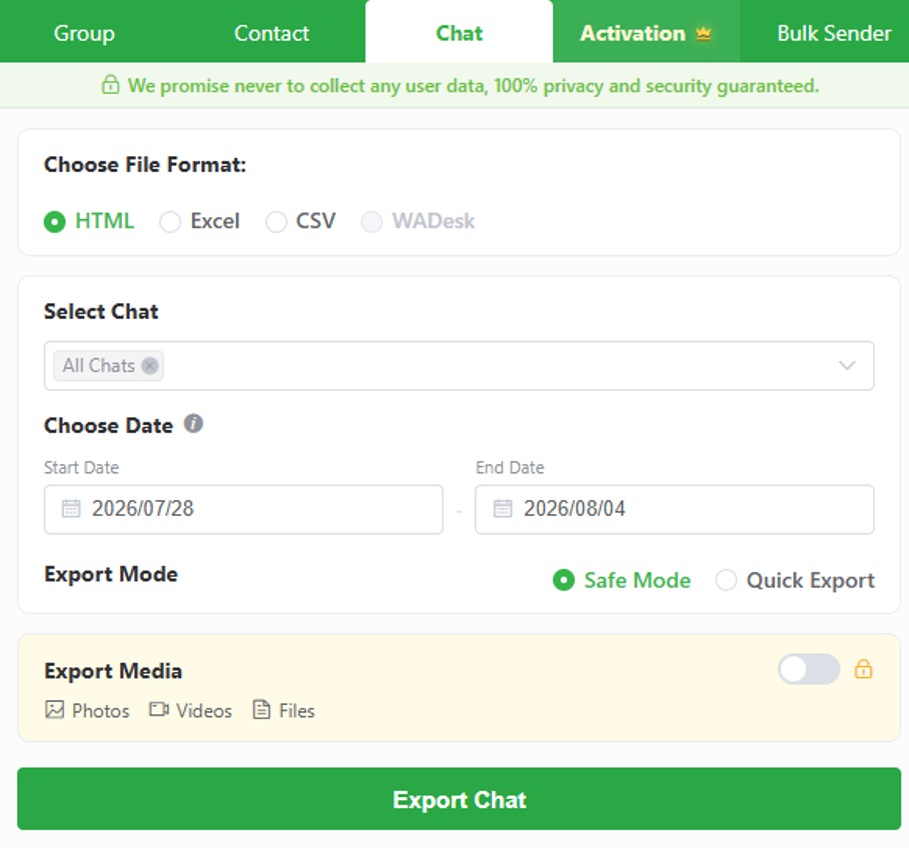
The date range should be as narrow as reasonably possible. For example, a delivery dispute may only require messages from the order date through the resolution date. A project handover may require recent conversations but not several years of unrelated history.
Limiting the scope makes the export easier to review and reduces the amount of personal or confidential information that must be protected.
Choose the Right File Format
WAExport supports HTML, Excel and CSV. Each format serves a different operational purpose.
HTML for Readable Records
HTML is appropriate when employees need to read the conversation in sequence. It may be useful for project documentation, customer service reviews or account handovers.
Because an HTML export can be edited after creation, it should not automatically be described as an immutable audit record.
Excel for Manual Review
Excel is useful when messages need to be sorted, filtered, labelled or supplemented with internal notes. It can support a structured review without requiring a separate data-processing system.
Copies containing personal data should remain in approved storage rather than being circulated through personal email accounts.
CSV for Structured Processing
CSV is suitable when message data needs to be processed by another authorised system. Before importing a large file, test a small sample to confirm that dates, special characters and message fields are interpreted correctly.
The export format should be selected according to the next operational step, not simply personal preference.
Select an Export Mode
The WAExport interface includes Safe Mode and Quick Export. Safe Mode provides a more measured export process, while Quick Export prioritises speed.
A team using the tool for the first time should begin with a short date range. This confirms that the selected chat, format and output structure are correct before a larger export is attempted.
A WhatsApp chat export tool can standardise settings such as the conversation, date range, file type, export mode and media inclusion. However, the operator must still review the result.
Decide Whether Media Is Necessary
Photos, videos and files can significantly increase the size and sensitivity of an export. They should only be included when they are relevant to the documented purpose.
Media may be required when a chat contains:
- Product or delivery photographs
- Receipts and invoices
- Design approvals
- Technical documents
- Evidence connected to a support case
If the team only needs written decisions or timestamps, media can normally be excluded.
Files should also be checked for confidential information before the export is shared. A photograph may reveal a home address, while a document may contain payment or identification details.
Standardise File Naming and Storage
Consistent file names make exported records easier to locate and reduce confusion between versions.
A practical naming pattern is:
Project_ConversationPurpose_DateRange_Version
For example:
Project-Atlas_Client-Handover_2026-06-01_to_2026-06-30_v1
The file should then be moved from the browser’s downloads folder into an approved storage location. Access should be limited to employees who need the information for their role.
Temporary copies should be deleted from local devices after the transfer has been verified.
Include Exports in Employee Offboarding
WhatsApp communication can create a continuity problem when an employee leaves the organisation. Relevant customer or project context may remain inside the employee’s account.
A controlled offboarding process should:
- Identify active business conversations
- Define which chats require transfer
- Select the relevant date ranges
- Export the required content
- Remove unrelated personal information
- Store the files in the correct project location
- Grant access to the incoming owner
- Delete unnecessary temporary copies
A chat export should accompany a written handover summary. The incoming employee should not be expected to reconstruct every outstanding task from a long conversation.
Set Retention and Deletion Rules
An exported file should not be retained indefinitely simply because storage is available. The owner should define a retention period based on the operational purpose and applicable company policy.
When the retention period ends, the file should be reviewed and deleted unless there is a documented reason to keep it.
Backups and duplicated copies must also be considered. Deleting one file from a shared folder may not remove versions stored on local devices or in email attachments.
Understand the Limits of a Chat Export
An HTML, Excel or CSV export is a convenient working record, but it is not automatically a complete compliance archive.
Standard files may lack:
- Tamper-evident controls
- Digital signatures
- Complete audit logs
- Automated retention enforcement
- Legal-hold functionality
- Verified chain-of-custody records
Organisations subject to formal recordkeeping requirements may need a dedicated archiving or e-discovery system. WAExport is more appropriately used for selective operational exports, reviews and handovers.
Operational Checklist
Before completing an export, confirm that:
- The business purpose is documented
- The correct account and chat are selected
- The date range is limited
- The chosen format matches the intended use
- Media is included only when necessary
- The resulting file has been reviewed
- The filename follows the internal convention
- Access is restricted
- Temporary copies are removed
- A retention or deletion date is recorded
Frequently Asked Questions
Which format is best for a business handover?
HTML is usually easiest to read. Excel may be preferable when the receiving employee needs to filter messages or add internal notes.
Should every business conversation be exported?
No. Exports should be limited to conversations required for a defined operational, contractual or review purpose.
Can WAExport select a specific period?
Yes. Users can set start and end dates before exporting a conversation.
Can photos and documents be included?
Yes. Users can choose whether to export photos, videos and files. Media should be included only when required.
Is a chat export a complete backup?
No. It creates a separate copy of selected conversation content and does not replace a complete account or device backup.
Conclusion
A WhatsApp chat export becomes more useful when it is part of a controlled operational process. Teams should define the purpose, limit the date range, choose an appropriate format and decide whether media is genuinely necessary.
WAExport provides the controls needed to create HTML, Excel or CSV versions of selected conversations. The organisation remains responsible for reviewing the files, managing access and deleting them when they are no longer required.
A concise runbook turns chat exporting from an improvised task into a repeatable process that supports documentation, business continuity and orderly team handovers.