
How to Size a 10ms UPS for Essential Devices?

Sizing a 10ms UPS starts with a simple goal: keep your essential devices running without overloads, shutdowns, or wasted battery capacity. A fast switchover matters for electronics that cannot tolerate noticeable interruption, including routers, desktop computers, modems, security gear, and some home office equipment. To choose the right unit, first total the running wattage of the devices you want to protect, then account for any startup surge, especially from motor-driven loads. Next, match that demand to UPS output capacity, leaving sensible headroom so the system runs efficiently and handles short spikes. Finally, calculate how long you want backup power to last. With those four steps, you can size a 10ms UPS accurately for practical home backup use.
Calculate the Power Load of Essential Devices
Add Running Watts and Account for Startup Surge
Begin by listing every device that must stay on during an outage and note each item’s running wattage from the power label, adapter, or user manual. Add those values to get your continuous load. A router may use 10 to 20W, a modem 10W, a monitor 20 to 60W, and a desktop computer 150 to 400W depending on use. If a device contains a motor or compressor, include startup surge as well, because the initial draw can briefly exceed normal consumption. Small networking gear usually has little surge, but mini fridges, fans, and some NAS units may spike higher. Your UPS must support both the steady load and that short startup demand without tripping or dropping power.
Understand Watts, VA, and Power Factor
UPS sizing often lists both watts and VA, and you need to understand the difference before choosing a model. Watts measure real power, the energy your devices actually consume. VA, or volt-amperes, measure apparent power, which includes inefficiency caused by the way some electronics draw current. Power factor is the relationship between the two: watts divided by VA. For example, a 600W load at 0.8 power factor equals 750VA. Many modern electronics have better power factor than older equipment, but UPS manufacturers still publish both numbers because the unit must handle each limit. When sizing, make sure your total device watts stay below the UPS watt rating and your total apparent load stays below its VA rating.
Size Your 10ms UPS Capacity and Runtime
Add Capacity Headroom Without Oversizing
After you calculate the load, add headroom so the UPS can operate comfortably rather than at its limit. A practical target is about 20 to 30 percent above your expected continuous wattage. If your essential devices total 300W, a UPS rated around 400W or more gives useful breathing room for efficiency losses, battery aging, and brief demand changes. Avoid extreme oversizing, though, because a much larger unit costs more and may be unnecessary for short-duration backup. The best fit is a UPS that covers your real load, startup surge, and a modest reserve. This approach improves reliability while keeping the system efficient, compact, and aligned with what you actually need to support during an outage.
Calculate Battery Capacity for Your Target Runtime
Runtime depends on battery capacity, load size, and system efficiency. A simple estimate is battery watt-hours multiplied by usable efficiency, then divided by your device load in watts. If a UPS has 500Wh usable energy and your essentials draw 100W, expect about five hours of backup before conversion losses; with efficiency considered, the real figure may be closer to four hours. This makes runtime planning straightforward: lower loads run longer, higher loads drain faster. Decide whether you only need enough time to bridge short outages and save work, or several hours for connectivity and basic comfort. For most home users, sizing runtime first prevents the common mistake of choosing adequate output power but insufficient battery energy for actual backup needs.
Match a 10ms UPS to Real-World Backup Needs
Size Backup for Routers, Computers, and Home Devices
Real-world sizing is easiest when you group devices by priority. For internet continuity, a modem and router often total 20 to 40W, so even a modest UPS can keep them online for hours. A home office setup with a router, monitor, and desktop may draw 200 to 450W, which requires more output capacity and significantly more battery if you want extended runtime. Add only the devices that matter most: networking gear, one computer, a lamp, phone chargers, or security equipment. Avoid plugging in unnecessary high-draw loads that shorten backup time. For a 10ms UPS portable power station, the key is seamless transfer plus enough wattage to support your essential devices during active use. Size the system for your must-have equipment first, then add convenience loads only if the available capacity and expected runtime still make sense.
Consider a 2kWh Power Station for Longer Backup
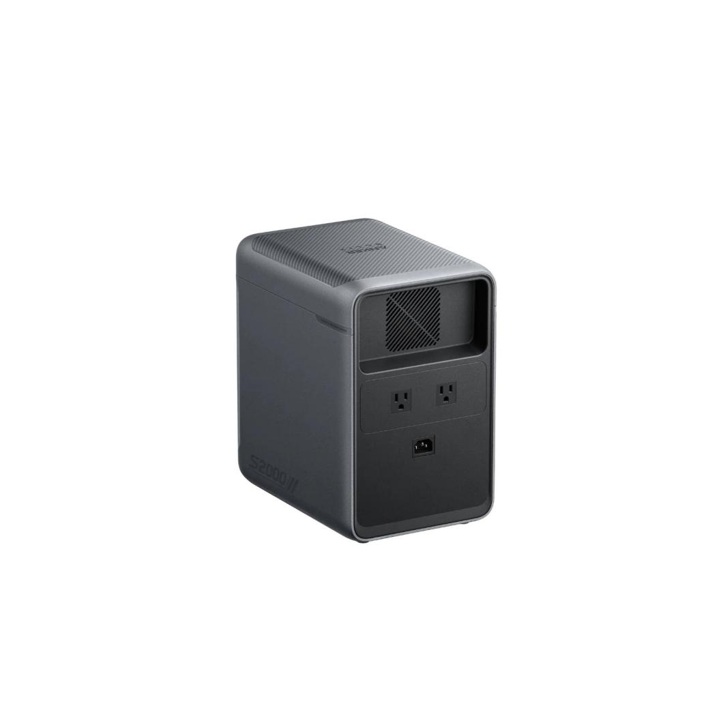
If you need longer backup, a 2kWh power station can cover both UPS performance and extended runtime in one system. The Anker SOLIX S2000 Portable Power Station offers 2,010Wh capacity, 1,500W AC rated output, up to 2,600W SurgePad output, 3,000W peak AC output, and a 10ms UPS switchover. That makes it suitable for essential electronics plus selected household devices during outages. Its LFP battery is designed for long service life, with 6,000 cycles to 80% capacity, while five 15A AC outlets support multi-device backup. For users who want more than brief shutdown protection, this type of unit can power routers, computers, lights, fans, and similar loads much longer, without requiring permanent home rewiring or a complex installation.
Conclusion
To size a 10ms UPS correctly, calculate four things in order: running watts, startup surge, output headroom, and required runtime. That process gives you a clear answer instead of guessing from product labels alone. Start with the devices you truly need during an outage, total their continuous load, then make sure the UPS can also handle short spikes. Choose a unit with roughly 20 to 30 percent extra capacity, and match battery watt-hours to the number of backup hours you want. For short interruptions, a smaller UPS may be enough. For longer protection across multiple essential devices, a higher-capacity solution can be the better fit. Good UPS sizing is practical, not excessive: enough power, enough runtime, and fast transfer when continuity matters most.