Operations | Monitoring | ITSM | DevOps | Cloud

The AIOps journey: Navigating the path to proactive IT operations

In the modern IT era, most organizations are heavily on their IT infrastructure to stay relevant and competitive. However, managing complex IT systems can be a daunting task, as the volume of data grows and IT environments become more heterogeneous. To address these challenges, many organizations are turning towards artificial intelligence for IT operations (AIOps)—an approach that leverages AI and ML to streamline IT operations, improve efficiency, and reduce downtime.
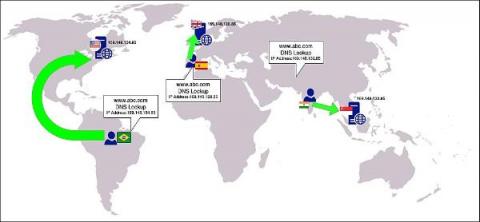
CloudDNS' geo-load balancing and redundancy ensure high availability and reliability

Cloud computing makes it easier for businesses to build and deploy applications that are accessible from anyplace in the world. But cloud computing also introduces new challenges, such as ensuring applications remain available even if there are network outages or unexpected spikes in traffic. ManageEngine CloudDNS provides a powerful geo-load balancing and redundancy feature that makes it easy to manage and distribute traffic across multiple servers and locations.

Network Path Monitoring Pinpoints and Mitigates Connection Bottlenecks

An employee calls complaining about slow response time. Another one has similar trouble. No red lights are flashing on the Network Operations console, so the network is up and running. What is happening? Frankly, it could be just about anything: an overworked router, a runaway process on a laptop, a slow loading web page, or a bandwidth hog at home.

Ship OpenTelemetry Data to Coralogix via Reverse Proxy (Caddy 2)

It is commonplace for organizations to restrict their IT systems from having direct or unsolicited access to external networks or the Internet, with network proxies serving as gatekeepers between an organization’s internal infrastructure and any external network. Network proxies can provide security and infrastructure admins the ability to specify specific points of data egress from their internal networks, often referred to as an egress controller.

What is log management used for?

Faced with an important business decision? Do you have the data you need to make it? Odds are, you probably don’t. Or, if the data is captured somewhere, can you count on it being in one place and easily accessible? This is a common issue, easily solved by proper log management. This practice is vital for data-driven businesses, helping you maintain security, troubleshoot operations more quickly and enhance user experience.

What is log management in security?

Cyber crimes are expected to cost the world roughly $10.5 trillion per year by 2025, according to Cybersecurity Ventures. And these attacks don’t just cost money. Businesses impacted by these kinds of crimes can expect to experience not only financial losses but also loss of productivity, damage to their reputation, potential legal liabilities and more.

What is log management in DevOps?

DevOps teams are used to working with data that is spread out across lots of different systems and environments. In organizations that have achieved tight collaboration with security teams to transition to DevSecOps, this is even more true! Log management is part of how all these teams keep track of information and make vital business decisions. It’s important to take a moment to understand what is meant by log management.

Monitoring and troubleshooting - Apache error log file analysis

Your Apache HTTP server access and error logs contain a wealth of actionable insights about potential server configuration and web application issues. The problem is that this information is hidden within millions of log messages, so you need analytics to efficiently extract these insights so you can respond to problems before they impact your users. Apache log analysis revolves around two activities: monitoring and troubleshooting.

Monitor NGINX Performance Automatically with AppSignal

Understanding how NGINX performs can be overwhelming. There are many data points to follow, and it can be tricky to know which ones are relevant to you and which ones you can ignore. In this article, we'll explain how you can use AppSignal to monitor NGINX, expanding your visibility over your application's performance.